1. MySQL完整性约束
前面我们学了数据类型,现在要看的是约束条件,和数据类型的宽度一样是可选参数。
作用:保证数据的完整性和一致性
约束条件主要有
PRIMARY KEY (PK)    标识该字段为该表的主键,可以唯一的标识记录
FOREIGN KEY (FK)    标识该字段为该表的外键
NOT NULL                    标识该字段不能为空
UNIQUE KEY (UK)    标识该字段的值是唯一的
AUTO_INCREMENT    标识该字段的值自动增长(整数类型,而且为主键)
DEFAULT                    为该字段设置默认值

UNSIGNED                 无符号
ZEROFILL                 使用0填充
约束说明
1. 是否允许为空,默认NULL,可设置NOT NULL,字段不允许为空,必须赋值
2. 字段是否有默认值,缺省的默认值是NULL,如果插入记录时不给字段赋值,此字段使用默认值
sex enum('male','female') not null default 'male'
age int unsigned NOT NULL default 20 必须为正值(无符号) 不允许为空 默认是20
3. 是否是key
主键 primary key
外键 foreign key
索引 (index,unique...)
1.1.1. not null与default
not null 是否可以为空值,null是空
not null 不允许为空值
null 可以为空值
default 默认值,创建列时可以指定默认值,当插入数据时如果未主动设置,则自动添加默认值
案例
null
允许是空值
mysql> create table t1(id int);   #id字段默认可以插入空
Query OK, 0 rows affected (0.01 sec)

mysql>
mysql>
mysql> desc t1;        #查看表结构 允许为空,默认值是null
+-------+---------+------+-----+---------+-------+
| Field | Type    | Null | Key | Default | Extra |
+-------+---------+------+-----+---------+-------+
| id    | int(11) | YES  |     | NULL    |       |
+-------+---------+------+-----+---------+-------+
1 row in set (0.00 sec)

mysql>
mysql>
mysql> insert into t1 values();       #插入2次空值,null
Query OK, 1 row affected (0.00 sec)

mysql> insert into t1 values();
Query OK, 1 row affected (0.00 sec)

mysql>
mysql>
mysql> select * from t1;
+------+
| id   |
+------+
| NULL |
| NULL |
+------+
2 rows in set (0.00 sec)
not null不允许为空值,必须有值
mysql> create table t2(id int  not null);
Query OK, 0 rows affected (0.01 sec)

mysql>
mysql> desc t2;
+-------+---------+------+-----+---------+-------+
| Field | Type    | Null | Key | Default | Extra |
+-------+---------+------+-----+---------+-------+
| id    | int(11) | NO   |     | NULL    |       |
+-------+---------+------+-----+---------+-------+
1 row in set (0.00 sec)

mysql>
mysql>
mysql> insert into t2 values();        #报错,不允许插入空值
ERROR 1364 (HY000): Field 'id' doesn't have a default value
mysql>
mysql> insert into t2 values(1);
Query OK, 1 row affected (0.00 sec)

mysql> select * from t2;
+----+
| id |
+----+
|  1 |
+----+
1 row in set (0.00 sec)
default
设置id字段有默认值后,则无论id字段是null还是not null,都可以插入空,插入空默认填入default指定的默认值
案例
mysql> create table t3(id int not null default 99 );
Query OK, 0 rows affected (0.01 sec)

mysql>
mysql>
mysql> desc t3;
+-------+---------+------+-----+---------+-------+
| Field | Type    | Null | Key | Default | Extra |
+-------+---------+------+-----+---------+-------+
| id    | int(11) | NO   |     | 99      |       |
+-------+---------+------+-----+---------+-------+
1 row in set (0.00 sec)

mysql> insert into t3 values();
Query OK, 1 row affected (0.00 sec)

mysql> select * from t3;
+----+
| id |
+----+
| 99 |
+----+
1 row in set (0.00 sec)
综合案例
俺去吃烧烤,老板卖的蔬菜,你不说,默认给你撒辣椒,用数据表实现
数据表字段设计提示:
字段解释
1.咱点烧烤 不能不说你想吃什么吧。。所以not null
2.价格,你要是不说话,老板默认荤的素的都收你2元
3.是否放辣,你不说话,就给你放辣
4.你不说话,老板默认人为你不打包,坐下来吃
案例
#创建数据表
create table bbq2 (
name varchar(50) not null,
price int default 2,
taste set('麻辣','不辣','椒盐','番茄酱') default '麻辣',
take_out enum('打包','不打包') default '不打包'
);

mysql> desc bbq2;
+----------+------------------------------------+------+-----+---------+-------+
| Field    | Type                               | Null | Key | Default | Extra |
+----------+------------------------------------+------+-----+---------+-------+
| name     | varchar(50)                        | NO   |     | NULL    |       |
| price    | int(11)                            | YES  |     | 2       |       |
| taste    | set('麻辣','不辣','椒盐','番茄酱')         | YES  |     | 麻辣    |       |
| take_out | enum('打包','不打包')                   | YES  |     | 不打包  |       |
+----------+------------------------------------+------+-----+---------+-------+
4 rows in set (0.00 sec)

#因为其他字段都有默认值,我们直接添加菜系名字
mysql> insert into bbq2(name) values('牛板筋'),('土豆片'),('金针菇');
Query OK, 3 rows affected (0.00 sec)
Records: 3  Duplicates: 0  Warnings: 0

#查看内容
mysql> select * from bbq2;
+--------+-------+-------+----------+
| name   | price | taste | take_out |
+--------+-------+-------+----------+
| 牛板筋 |     2 | 麻辣  | 不打包   |
| 土豆片 |     2 | 麻辣  | 不打包   |
| 金针菇 |     2 | 麻辣  | 不打包   |
+--------+-------+-------+----------+
3 rows in set (0.00 sec)

#自定义字段值
mysql> insert into bbq2 values('小青菜',1,'番茄酱','打包');
Query OK, 1 row affected (0.00 sec)

#查看表数据内容
mysql> select * from bbq2;
+--------+-------+--------+----------+
| name   | price | taste  | take_out |
+--------+-------+--------+----------+
| 牛板筋 |     2 | 麻辣   | 不打包   |
| 土豆片 |     2 | 麻辣   | 不打包   |
| 金针菇 |     2 | 麻辣   | 不打包   |
| 小青菜 |     1 | 番茄酱 | 打包     |
+--------+-------+--------+----------+
4 rows in set (0.00 sec)
1.1.2. 唯一约束unique
字段值唯一,防止插入数据表重复值
案例
一个家庭,一般只有一个女人当家,,,男人嘛,很难受,香菇
其他应用场景,如网站的邮箱注册,手机号注册,数据库内不得重复
#创建home表,家庭人数不得重复
#家庭女主人地位不得重复
mysql> create table home(
    -> id int unique,
    -> home_master_name varchar(100) unique
    -> )
    -> ;
Query OK, 0 rows affected (0.01 sec)

#插入一个女主人,没毛病
mysql> insert into home values(1,'女主人');
Query OK, 1 row affected (0.00 sec)

#错误演示,id,和女主人都是unique,不得重复
mysql> insert into home values(1,'女主人');
ERROR 1062 (23000): Duplicate entry '1' for key 'id'
mysql> insert into home values(2,'女主人');
ERROR 1062 (23000): Duplicate entry '女主人' for key 'home_master_name'
mysql> insert into home values(1,'男主人');
ERROR 1062 (23000): Duplicate entry '1' for key 'id'

#偶尔也让男人当回家。。。
mysql> insert into home values(2,'男主人');
Query OK, 1 row affected (0.00 sec)

mysql>
mysql>
mysql> select * from home;
+------+------------------+
| id   | home_master_name |
+------+------------------+
|    1 | 女主人           |
|    2 | 男主人           |
+------+------------------+
2 rows in set (0.00 sec)

#此时表结构如下
mysql> desc home;
+------------------+--------------+------+-----+---------+-------+
| Field            | Type         | Null | Key | Default | Extra |
+------------------+--------------+------+-----+---------+-------+
| id               | int(11)      | YES  | UNI | NULL    |       |
| home_master_name | varchar(100) | YES  | UNI | NULL    |       |
+------------------+--------------+------+-----+---------+-------+
2 rows in set (0.00 sec)
查看not null和unique的蜜汁关系
not null 加上unique,此时字段就是一个 主键
mysql> create table home2(id int not null unique);
Query OK, 0 rows affected (0.01 sec)

mysql> desc home2;
+-------+---------+------+-----+---------+-------+
| Field | Type    | Null | Key | Default | Extra |
+-------+---------+------+-----+---------+-------+
| id    | int(11) | NO   | PRI | NULL    |       |
+-------+---------+------+-----+---------+-------+
1 row in set (0.00 sec)
联合唯一
有时候我们需要让多个字段,进行联合唯一,也就是字段1+字段2组合在一起,不得重复。
场景:
例如服务器的host+port,定位一个唯一的服务,不允许地址占用。
例如搞对象,一个男的+一个女的,就是一个联合唯一,不得重复
案例
1.linux服务
ngin         192.168.1.100          80
mysql      192.168.1.100         3306
redis        192.168.1.100         6379
2.月老牵红线,一个男孩+一个女孩组成一对儿,不得重复
mysql> create table red_line(
    -> id int primary key auto_increment,
    -> boy_name varchar(50),
    -> girl_name varchar(50),
    -> unique(boy_name,girl_name)
    -> );
Query OK, 0 rows affected (0.02 sec)

#查看此时表结构
mysql> desc red_line;
+-----------+-------------+------+-----+---------+----------------+
| Field     | Type        | Null | Key | Default | Extra          |
+-----------+-------------+------+-----+---------+----------------+
| id        | int(11)     | NO   | PRI | NULL    | auto_increment |
| boy_name  | varchar(50) | YES  | MUL | NULL    |                |
| girl_name | varchar(50) | YES  |     | NULL    |                |
+-----------+-------------+------+-----+---------+----------------+
3 rows in set (0.00 sec)

#插入数据,注意字段数量,必须和值数量对应
insert into red_line(boy_name,girl_name) values('许仙','白娘子'),('冯绍峰','赵丽颖'),('王宝强','');

#查看红线结果
mysql> select * from red_line;
+----+----------+-----------+
| id | boy_name | girl_name |
+----+----------+-----------+
|  2 | 冯绍峰   | 赵丽颖    |
|  3 | 王宝强   |           |
|  1 | 许仙     | 白娘子    |
+----+----------+-----------+
3 rows in set (0.00 sec)

#插入重复值,失败
mysql> insert into red_line(boy_name,girl_name) values('冯绍峰','赵丽颖');
ERROR 1062 (23000): Duplicate entry '冯绍峰-赵丽颖' for key 'boy_name'

#必须牵一根新的红线
mysql> insert into red_line(boy_name,girl_name) values('冯绍峰','霍建华');
Query OK, 1 row affected (0.00 sec)

#查看最新数据表关系
mysql> select * from red_line;
+----+----------+-----------+
| id | boy_name | girl_name |
+----+----------+-----------+
|  2 | 冯绍峰   | 赵丽颖    |
|  5 | 冯绍峰   | 霍建华    |
|  3 | 王宝强   |           |
|  1 | 许仙     | 白娘子    |
+----+----------+-----------+
4 rows in set (0.00 sec)
1.1.3. 主键约束
primary key字段的值不为空且唯一
一个表中可以:
单列做主键 多列做主键(复合主键)
但一个表内只能有一个主键primary key
案例
写一个歌手的数据表,使用主键
创建主键方式一,not null 加上 unique
#创建数据表
mysql> create table singer(
    -> id int not null unique,
    -> name varchar(50) not null unique,
    -> song varchar(50)
    -> );
Query OK, 0 rows affected (0.01 sec)

#查看表结构,只有一个primary key
mysql> desc singer;
+-------+-------------+------+-----+---------+-------+
| Field | Type        | Null | Key | Default | Extra |
+-------+-------------+------+-----+---------+-------+
| id    | int(11)     | NO   | PRI | NULL    |       |
| name  | varchar(50) | NO   | UNI | NULL    |       |
| song  | varchar(50) | YES  |     | NULL    |       |
+-------+-------------+------+-----+---------+-------+
3 rows in set (0.00 sec)
创建主键方式二,使用primary key关键字
create table singer2(
id int primary key,
name varchar(50) not null unique,
song varchar(50)
);
创建方式三,在字段结尾定义主键,
Constraint 是mysql关键字,定义约束条件
Pk_name 外键的名字
primary key(字段名) 添加你设置为主键的字段
create table singer3(
id int ,
name varchar(50) not null unique,
song varchar(50),
constraint pk_name primary key(id)
);
插入表数据
mysql> insert into singer3 values(1,'张杰','看月亮爬上来'),(2,'杨幂','爱的供养');
Query OK, 2 rows affected (0.00 sec)
Records: 2  Duplicates: 0  Warnings: 0

mysql> select * from singer3;
+----+------+--------------+
| id | name | song         |
+----+------+--------------+
|  1 | 张杰 | 看月亮爬上来 |
|  2 | 杨幂 | 爱的供养     |
+----+------+--------------+
2 rows in set (0.00 sec)
1.1.4. 自增auto_increment
约束字段为自动增长,被约束的字段必须同时被key约束
mysql> create table singer4(
    -> id int primary key auto_increment,
    -> name varchar(50) not null unique,
    -> song varchar(50)
    -> );
Query OK, 0 rows affected (0.01 sec)

#查看表结构
mysql> desc singer4;
+-------+-------------+------+-----+---------+----------------+
| Field | Type        | Null | Key | Default | Extra          |
+-------+-------------+------+-----+---------+----------------+
| id    | int(11)     | NO   | PRI | NULL    | auto_increment |
| name  | varchar(50) | NO   | UNI | NULL    |                |
| song  | varchar(50) | YES  |     | NULL    |                |
+-------+-------------+------+-----+---------+----------------+
3 rows in set (0.00 sec)

#插入表数据
insert into singer4(name,song) values('王力宏','大城小爱'),('周杰伦','给我一首歌的时间'),('蔡依林','倒带');

#查看数据
mysql> select * from singer4;
+----+--------+------------------+
| id | name   | song             |
+----+--------+------------------+
|  1 | 王力宏 | 大城小爱         |
|  2 | 周杰伦 | 给我一首歌的时间   |
|  3 | 蔡依林 | 倒带             |
+----+--------+------------------+
3 rows in set (0.00 sec)

#指定id号插入
mysql> insert into singer4 values(5,'林俊杰','她说');
Query OK, 1 row affected (0.00 sec)

mysql> select * from singer4;
+----+--------+------------------+
| id | name   | song             |
+----+--------+------------------+
|  1 | 王力宏 | 大城小爱         |
|  2 | 周杰伦 | 给我一首歌的时间 |
|  3 | 蔡依林 | 倒带             |
|  5 | 林俊杰 | 她说             |
+----+--------+------------------+
4 rows in set (0.00 sec)

#此时自增从当前id继续插入
mysql> insert into singer4(name,song) values('陶喆','你爱我还是他');
Query OK, 1 row affected (0.01 sec)

mysql> select * from singer4;
+----+--------+------------------+
| id | name   | song             |
+----+--------+------------------+
|  1 | 王力宏 | 大城小爱         |
|  2 | 周杰伦 | 给我一首歌的时间 |
|  3 | 蔡依林 | 倒带             |
|  5 | 林俊杰 | 她说             |
|  6 | 陶喆   | 你爱我还是他     |
+----+--------+------------------+
5 rows in set (0.00 sec)
补充:删除表记录的方式
delete每次删除一行,但是保留删除操作再事务记录中便于回滚。
truncate 一次性删除表中所有记录,然后重新创建一个表。
mysql> delete from singer4;
Query OK, 5 rows affected (0.00 sec)

mysql> select * from singer4;
Empty set (0.00 sec)

mysql> insert into singer4(name,song) values("汪峰",'北京北京');
Query OK, 1 row affected (0.01 sec)

#id还存在7
mysql> select * from singer4;
+----+------+----------+
| id | name | song     |
+----+------+----------+
|  7 | 汪峰 | 北京北京 |
+----+------+----------+
1 row in set (0.00 sec)
#应该用truncate清空表,比起delete一条一条地删除记录,truncate是直接清空表,在删除大表时用它
mysql> insert into singer4(name,song) values("阿杜",'藏在车底下');
Query OK, 1 row affected (0.00 sec)

mysql> select * from singer4;
+----+------+------------+
| id | name | song       |
+----+------+------------+
|  1 | 阿杜 | 藏在车底下 |
+----+------+------------+
1 row in set (0.00 sec)
1.1.5. 设置表的自增起点值
#创建表时,设置自增起始值
create table singer5(
id int primary key auto_increment,
name varchar(50),
song varchar(50)
)auto_increment=4;

#查看表创建SQL
mysql> show create table singer5\G
*************************** 1. row ***************************
       Table: singer5
Create Table: CREATE TABLE `singer5` (
  `id` int(11) NOT NULL AUTO_INCREMENT,
  `name` varchar(50) DEFAULT NULL,
  `song` varchar(50) DEFAULT NULL,
  PRIMARY KEY (`id`)
) ENGINE=InnoDB AUTO_INCREMENT=4 DEFAULT CHARSET=utf8
1 row in set (0.00 sec)

mysql> insert into singer5(name,song) values('TANK','千年之泪');
Query OK, 1 row affected (0.00 sec)

mysql> select * from singer5;
+----+------+----------+
| id | name | song     |
+----+------+----------+
|  4 | TANK | 千年之泪 |
+----+------+----------+
1 row in set (0.00 sec)

#自增数目每次加一
mysql> insert into singer5(name,song) values('花儿乐队','化蝶飞');
Query OK, 1 row affected (0.00 sec)

mysql> select * from singer5;
+----+----------+----------+
| id | name     | song     |
+----+----------+----------+
|  4 | TANK     | 千年之泪 |
|  5 | 花儿乐队 | 化蝶飞   |
+----+----------+----------+
2 rows in set (0.00 sec)
设置自增的步长
修改mysql参数
mysql自增的步长:
    show session variables like 'auto_inc%';

    #基于会话级别
    set session auto_increment_increment=2; #修改会话级别的步长

    #基于全局级别的
    set global auto_increment_increment=2 #修改全局级别的步长(所有会话都生效)
新建一张表,要求自增id是奇数列
mysql> create table singer6(
    -> id int primary key auto_increment,
    -> name varchar(50),
    -> song varchar(50)
    -> );
Query OK, 0 rows affected (0.01 sec)

mysql> set session auto_increment_increment=2;
Query OK, 0 rows affected (0.00 sec)

mysql> insert into singer6(name,song) values('刘欢','好汉歌');
Query OK, 1 row affected (0.00 sec)

mysql>
mysql>
mysql> select * from singer6;
+----+------+--------+
| id | name | song   |
+----+------+--------+
|  1 | 刘欢 | 好汉歌 |
+----+------+--------+
1 row in set (0.00 sec)

mysql> insert into singer6(name,song) values('刘德华','笨小孩');
Query OK, 1 row affected (0.00 sec)

mysql> select * from singer6;
+----+--------+--------+
| id | name   | song   |
+----+--------+--------+
|  1 | 刘欢   | 好汉歌 |
|  3 | 刘德华 | 笨小孩 |
+----+--------+--------+
2 rows in set (0.00 sec)
1.1.6. 外键foreign key
外键是某个表中的一列,它包含另一个表的主键值,定义两张表之间的关系。
外键好处:
1.信息不重复,节省磁盘空间
2.如果信息变动,只需要更新外键表的信息
3、数据无重复,更容易管理
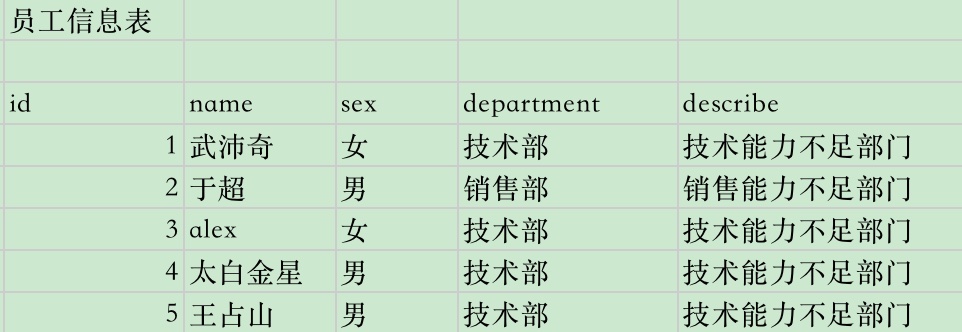
问题1:如果员工有一百个,一万个,那么这张表要重复填写部门信息一万次,非常占资源
问题2:如果哪天公司部门更改名,技术部改为IT部,我们得修改所有行的记录,费时费力,效率低
解决办法
如上的表信息,我们最好是建立两张表,一个存储员工信息,一个存储部门信息,通过外键关联
员工表的dep_id字段,关联到部门表的dep字段

SQL实现表
注意,先创建被关联的表,再创建关联的表
注意,被关联的表,必须保证被关联字段唯一性,也就是设置为主键(非空且唯一)
创建外键语法
constraint fk_name  foreign key(dpt_id)     references  department(id)

解释

关键词(约束)            constraint
外键名                   fk_name
关键词(外键)(关联表的字段名)         foreign key(dpt_id)
关键词(查阅)                   references
表名(主键名)         department(id)
创建外键案例
#创建部门表 dep,保证id号是主键
create table dep (
id int primary key,
name char(16),
comment char(50)
);

#创建emp员工表
create table emp(
id int primary key,
name char(10),
sex enum('male','female'),
dep_id int,
foreign key(dep_id) references dep(id)
);

#查看员工表结构
mysql> desc emp;
+--------+-----------------------+------+-----+---------+-------+
| Field  | Type                  | Null | Key | Default | Extra |
+--------+-----------------------+------+-----+---------+-------+
| id     | int(11)               | NO   | PRI | NULL    |       |
| name   | char(10)              | YES  |     | NULL    |       |
| sex    | enum('male','female') | YES  |     | NULL    |       |
| dep_id | int(11)               | YES  | MUL | NULL    |       |
+--------+-----------------------+------+-----+---------+-------+
4 rows in set (0.00 sec)

#部门表信息
mysql> desc dep;
+---------+----------+------+-----+---------+-------+
| Field   | Type     | Null | Key | Default | Extra |
+---------+----------+------+-----+---------+-------+
| id      | int(11)  | NO   | PRI | NULL    |       |
| name    | char(16) | YES  |     | NULL    |       |
| comment | char(50) | YES  |     | NULL    |       |
+---------+----------+------+-----+---------+-------+
3 rows in set (0.00 sec)
必须先插入被关联的表数据,部门表
mysql> insert into dep values(1,'IT部','技术能力有限部门'),(2,'销售部','销售能力不足部门'),(3,'保洁部','打扫卫生很强部门');
Query OK, 3 rows affected (0.00 sec)
Records: 3  Duplicates: 0  Warnings: 0

mysql> select * from dep;
+----+--------+------------------+
| id | name   | comment          |
+----+--------+------------------+
|  1 | IT部   | 技术能力有限部门 |
|  2 | 销售部 | 销售能力不足部门 |
|  3 | 保洁部 | 打扫卫生很强部门 |
+----+--------+------------------+
3 rows in set (0.00 sec)
此时可以插入关联表,员工表
#插入数据
mysql> insert into emp values(1,'无佩奇','female',1),(2,'alex','female',3),(3,'于超','male',2);
Query OK, 3 rows affected (0.00 sec)
Records: 3  Duplicates: 0  Warnings: 0

#查看员工表数据
mysql> select * from emp;
+----+--------+--------+--------+
| id | name   | sex    | dep_id |
+----+--------+--------+--------+
|  1 | 无佩奇 | female |      1 |
|  2 | alex   | female |      3 |
|  3 | 于超   | male   |      2 |
+----+--------+--------+--------+
3 rows in set (0.00 sec)
删除有外键关系的数据表
假设由于公司不挣钱,公司要开掉IT部门,如何删除?
先删关联表的数据,再删被关联的数据
答:要先解散在这个部门的员工,然后删除这个部门
mysql> delete from emp where id=1;
Query OK, 1 row affected (0.00 sec)

mysql> delete from dep where id=1;
Query OK, 1 row affected (0.00 sec)
外键之更新同步,删除同步
如上的数据表,我们必须删除关联表记录,才能删除被关联表记录。
此处有新的办法
添加关键字
on delete cascade  删除同步,可以实现在从父表中删除数据时自动删除子表中的数据。
on update cascade  更新同步
案例
#创建部门表
create table department(
id int primary key,
name varchar(20) not null
)engine=innodb;

#创建员工表
create table employee(
id int primary key,
name varchar(20) not null,
dpt_id int,
constraint fk_name foreign key(dpt_id)
references department(id)
on delete cascade
on update cascade
)engine=innodb;
先插入被关联表信息,部门表
mysql> insert into department values(1,'保洁部'),(2,'财务部'),(3,'技术部');
Query OK, 3 rows affected (0.00 sec)
Records: 3  Duplicates: 0  Warnings: 0

mysql> select * from department;
+----+--------+
| id | name   |
+----+--------+
|  1 | 保洁部 |
|  2 | 财务部 |
|  3 | 技术部 |
+----+--------+
3 rows in set (0.00 sec)
插入员工表信息
mysql>  insert into employee values(1,'alex',1),(2,'无佩奇',1),(3,'于超',3),(4,'钢铁侠',3),(5,'杨幂',2);
Query OK, 5 rows affected (0.01 sec)
Records: 5  Duplicates: 0  Warnings: 0

mysql>
mysql> select * from employee;
+----+--------+--------+
| id | name   | dpt_id |
+----+--------+--------+
|  1 | alex   |      1 |
|  2 | 无佩奇 |      1 |
|  3 | 于超   |      3 |
|  4 | 钢铁侠 |      3 |
|  5 | 杨幂   |      2 |
+----+--------+--------+
5 rows in set (0.00 sec)
由于咱们建表时候,添加了删除时同步,因此可以直接先清空部门信息,也会删除关联的员工表数据。
mysql> delete from department where id=1;
Query OK, 1 row affected (0.00 sec)

mysql>
mysql>
mysql> select * from employee;
+----+--------+--------+
| id | name   | dpt_id |
+----+--------+--------+
|  3 | 于超   |      3 |
|  4 | 钢铁侠 |      3 |
|  5 | 杨幂   |      2 |
+----+--------+--------+
3 rows in set (0.00 sec)
更新被关联表部门表,员工表信息也会跟着修改
我们将部门表中技术部的ID改为100,员工表中的外键字段也会跟着修改
mysql> update department set id=100 where id=3;
Query OK, 1 row affected (0.00 sec)
Rows matched: 1  Changed: 1  Warnings: 0

mysql>
mysql>
mysql> select * from employee;
+----+--------+--------+
| id | name   | dpt_id |
+----+--------+--------+
|  3 | 于超   |    100 |
|  4 | 钢铁侠 |    100 |
|  5 | 杨幂   |      2 |
+----+--------+--------+
3 rows in set (0.00 sec)
找到两张表的关系敲门
分析步骤:
#1、先站在左表的角度去找
是否左表的多条记录可以对应右表的一条记录,如果是,则证明左表的一个字段foreign key 右表一个字段(通常是id)

#2、再站在右表的角度去找
是否右表的多条记录可以对应左表的一条记录,如果是,则证明右表的一个字段foreign key 左表一个字段(通常是id)

#3、总结:
#多对一:
如果只有步骤1成立,则是左表多对一右表
如果只有步骤2成立,则是右表多对一左表

#多对多
如果步骤1和2同时成立,则证明这两张表时一个双向的多对一,即多对多,需要定义一个这两张表的关系表来专门存放二者的关系

#一对一:
如果1和2都不成立,而是左表的一条记录唯一对应右表的一条记录,反之亦然。这种情况很简单,就是在左表foreign key右表的基础上,将左表的外键字段设置成unique即可
1.1.7. 建立表之间的关系
一对多的场景:
多个员工属于同一个部门
#先有部门,再招员工,创建部门表
create table dep (
    id int primary key auto_increment,
    name char(16),
    comment char(50)
);

#创建员工表,外键关联部门表
create table emp(
    id int primary key auto_increment,
    name char(10),
    sex enum('male','female'),
    dep_id int,
    foreign key(dep_id) references dep(id)
    on delete cascade
    on update cascade
);

#插入部门数据,创建部门信息
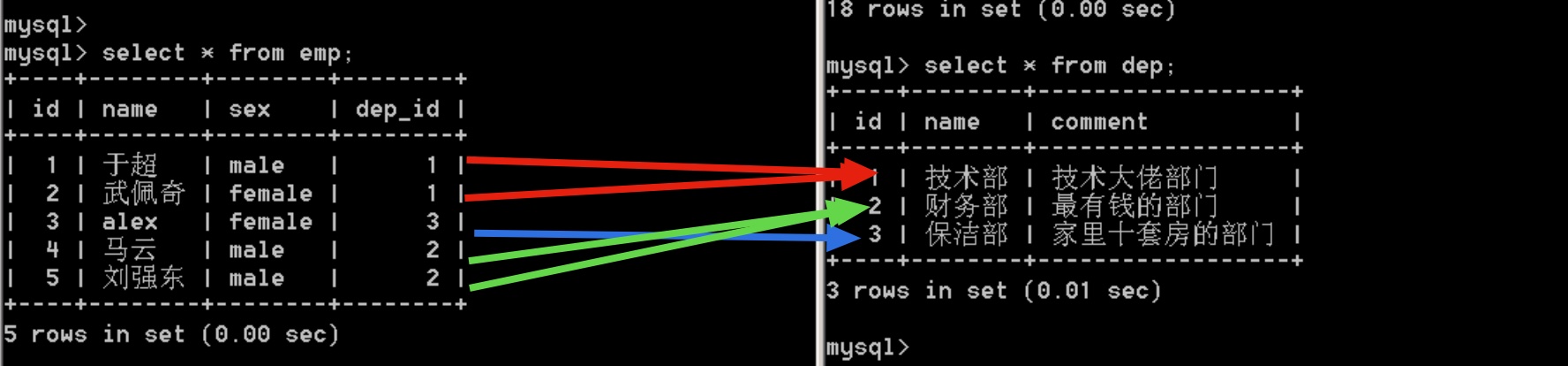
insert into dep(name,comment) values('技术部','技术大佬部门'),('财务部','最有钱的部门'),('保洁部','家里十套房的部门');

mysql> select * from dep;
+----+--------+------------------+
| id | name   | comment          |
+----+--------+------------------+
|  1 | 技术部 | 技术大佬部门     |
|  2 | 财务部 | 最有钱的部门     |
|  3 | 保洁部 | 家里十套房的部门 |
+----+--------+------------------+
3 rows in set (0.00 sec)

#插入员工数据
insert into emp(name,sex,dep_id) values('于超','male',1),('武佩奇','female',1),('alex','female',3),('马云','male',2),('刘强东','male',2);

mysql> select * from emp;
+----+--------+--------+--------+
| id | name   | sex    | dep_id |
+----+--------+--------+--------+
|  1 | 于超   | male   |      1 |
|  2 | 武佩奇 | female |      1 |
|  3 | alex   | female |      3 |
|  4 | 马云   | male   |      2 |
|  5 | 刘强东 | male   |      2 |
+----+--------+--------+--------+
5 rows in set (0.00 sec)
此时的员工,部门表,就是一对多的关系,一个部门表,可以对应多个员工
1.1.8. 多对多表设计
我们都看过书,各种书,有啥捏?






书籍一般有:作者信息,书名,出版社信息
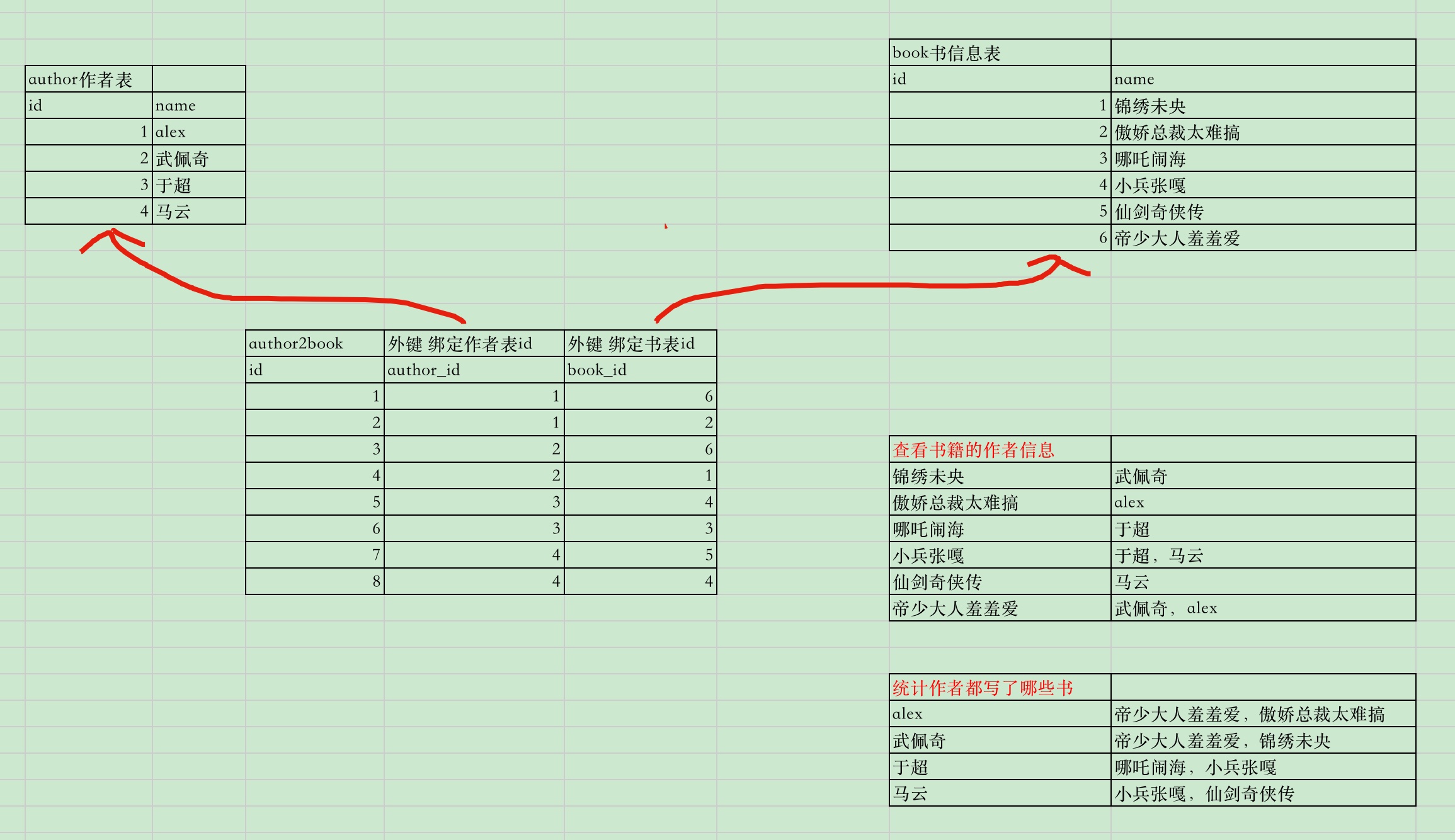
书和作者的关系:一个作者可以写多本书,一本书也可以有多个作者,这种双向的一对多,就是多对多(manyToMany)
关联多对多的方式:foreign key + 一张新的表
这里注意一个概念:
注意,先创建被关联的表,再创建关联的表
注意,先创建被关联的表,再创建关联的表
注意,先创建被关联的表,再创建关联的表

也就是说,我们想创建书表,和作者表,并且建立双向的外键关系,那彼此互相依赖,就无法创建了
创建多对多的办法:
使用第三张表,中间表,互相关联两张表的关系
图示:
#创建一个作者表
create table author(
id int primary key auto_increment,
name varchar(50)
);

#创建一个书籍表
create table book(
id int primary key auto_increment,
name varchar(50)
);

#建立中间表
create table author2book(
id int not null unique auto_increment,
author_id int not null,
book_id int not null,
constraint fk_author foreign key(author_id) references author(id)
on delete cascade
on update cascade,
constraint fk_book foreign key(book_id) references book(id)
on delete cascade
on update cascade,
primary key(author_id,book_id)
);

#插入作者信息
insert into author(name) values('alex'),('五佩奇'),('宇超'),('马云');

#插入书籍信息
insert into book(name) values('锦绣未央'),('傲娇总裁太难搞'),('哪吒闹海'),('小兵张嘎'),('仙剑奇侠传'),('帝少大人羞羞爱');

#插入中间表,作者和书籍的关系
insert into author2book(author_id,book_id) values(1,6),(1,2),(2,6),(2,1),(3,4),(3,3),(4,5),(4,4);
查看书籍数据
mysql> select * from author2book;
+----+-----------+---------+
| id | author_id | book_id |
+----+-----------+---------+
|  1 |         1 |       6 |
|  2 |         1 |       2 |
|  3 |         2 |       6 |
|  4 |         2 |       1 |
|  5 |         3 |       4 |
|  6 |         3 |       3 |
|  7 |         4 |       5 |
|  8 |         4 |       4 |
+----+-----------+---------+
8 rows in set (0.00 sec)

mysql> select * from author;
+----+--------+
| id | name   |
+----+--------+
|  1 | alex   |
|  2 | 五佩奇 |
|  3 | 宇超   |
|  4 | 马云   |
+----+--------+
4 rows in set (0.00 sec)

mysql> select * from book;
+----+----------------+
| id | name           |
+----+----------------+
|  1 | 锦绣未央       |
|  2 | 傲娇总裁太难搞 |
|  3 | 哪吒闹海       |
|  4 | 小兵张嘎       |
|  5 | 仙剑奇侠传     |
|  6 | 帝少大人羞羞爱 |
+----+----------------+
6 rows in set (0.00 sec)
1.1.9. 表关系一对一
外键约束
MySQL通过外键约束来保证表与表之间的数据的完整性和准确性。
单纯的外键设置,两张表之间会有重复记录,实现多对一的关系
要实现一对一的表关系,场景如下:
一个教室表,一个课程表,一门老师只教一门课
实现方式:外键+唯一约束
foreign key + unique
老师和课程的关系,是课程表来foreign key 老师表
因为学校的课不会变,老师可能会辞职,换一拨人,记录可能会变动
SQL实现
#创建老师表
create table teacher(
id int primary key auto_increment,
name varchar(20) not null,
sex enum('male','female')
);

#创建课程表
create table course(
id int primary key auto_increment,
name varchar(20) not null,
teacher_id int unique,
foreign key (teacher_id) references teacher(id)
on delete cascade
on update cascade
);

#插入老师信息
 mysql> insert into teacher(name,sex) values('于老师','male'),('武老师','female'),('苍老师','female'),('波多老师','female');
Query OK, 4 rows affected (0.00 sec)
Records: 4  Duplicates: 0  Warnings: 0

#插入课程信息
mysql> insert into course(name,teacher_id) values('测试开发',1),('python框架开发',2),('app移动端性能测试',3),('接口自动化测试',4);
Query OK, 4 rows affected (0.00 sec)
Records: 4  Duplicates: 0  Warnings: 0

#查看课程信息
mysql> select * from course;
+----+-------------------+------------+
| id | name              | teacher_id |
+----+-------------------+------------+
|  1 | 测试开发          |          1 |
|  2 | python框架开发    |          2 |
|  3 | app移动端性能测试 |          3 |
|  4 | 接口自动化测试    |          4 |
+----+-------------------+------------+
4 rows in set (0.00 sec)

#此时课程表中,老师id是唯一,不得重复的,也就实现了一个老师只能教一门课,代码如下
mysql> insert into course(name,teacher_id) values('编程语言基础',1);
ERROR 1062 (23000): Duplicate entry '1' for key 'teacher_id'
1.1.10. 关系表作业
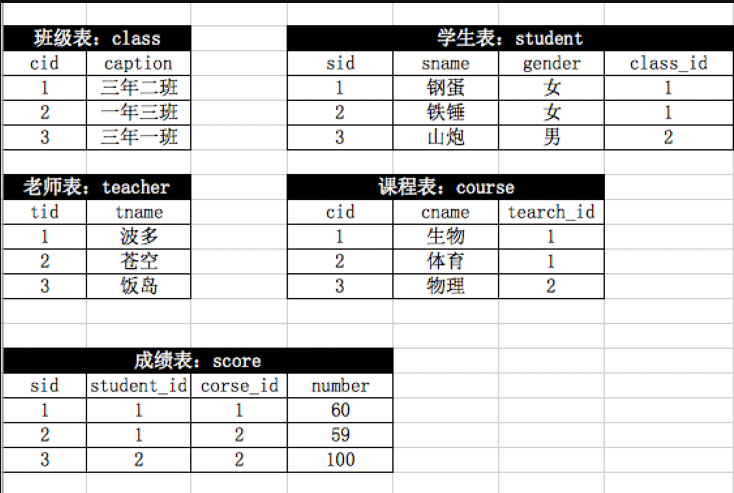
create table class(
cid int primary key auto_increment,
caption varchar(50) not null
);

create table student(
sid int primary key auto_increment,
sname varchar(50) not null,
gender enum('男','女'),
class_id int,
foreign key(class_id) references class(cid)
on delete cascade
on update cascade
);


create table teacher(
tid int primary key auto_increment,
tname varchar(50) not null
);


create table course(
cid int primary key auto_increment,
cname varchar(50),
teacher_id int,
foreign key(teacher_id) references teacher(tid)
on delete cascade
on update cascade
);


create table score(
sid int not null unique auto_increment,
student_id int not null,
foreign key(student_id) references student(sid)
on delete cascade
on update cascade,
course_id int not null,
foreign key(course_id) references course(cid)
on delete cascade
on update cascade,
number int not null,
primary key(student_id,course_id)
);
插入数据
mysql> insert into class(caption) values('三年二班'),('一年三班'),('三年一班');
Query OK, 3 rows affected (0.01 sec)
Records: 3  Duplicates: 0  Warnings: 0

mysql> insert into student(sname,gender,class_id) values('钢蛋','女',1),('铁锤','女',1),('山炮','男',2);
Query OK, 3 rows affected (0.00 sec)
Records: 3  Duplicates: 0  Warnings: 0

mysql> insert into teacher(tname) values('波多'),('苍空'),('饭岛');
Query OK, 3 rows affected (0.00 sec)
Records: 3  Duplicates: 0  Warnings: 0

mysql> insert into course(cname,teacher_id) values('生物',1),('体育',1),('物理',2);
Query OK, 3 rows affected (0.00 sec)
Records: 3  Duplicates: 0  Warnings: 0

mysql> insert into score(student_id,course_id,number) values(1,1,60),(1,2,59),(2,2,100);
Query OK, 3 rows affected (0.00 sec)
Records: 3  Duplicates: 0  Warnings: 0
查看数据
mysql> select * from class;
+-----+----------+
| cid | caption  |
+-----+----------+
|   1 | 三年二班 |
|   2 | 一年三班 |
|   3 | 三年一班 |
+-----+----------+
3 rows in set (0.00 sec)

mysql> select * from student;
+-----+-------+--------+----------+
| sid | sname | gender | class_id |
+-----+-------+--------+----------+
|   1 | 钢蛋  | 女     |        1 |
|   2 | 铁锤  | 女     |        1 |
|   3 | 山炮  | 男     |        2 |
+-----+-------+--------+----------+
3 rows in set (0.00 sec)

mysql> select * from teacher;
+-----+-------+
| tid | tname |
+-----+-------+
|   1 | 波多  |
|   2 | 苍空  |
|   3 | 饭岛  |
+-----+-------+
3 rows in set (0.00 sec)

mysql> select * from course;
+-----+-------+------------+
| cid | cname | teacher_id |
+-----+-------+------------+
|   1 | 生物  |          1 |
|   2 | 体育  |          1 |
|   3 | 物理  |          2 |
+-----+-------+------------+
3 rows in set (0.00 sec)

mysql> select * from score;
+-----+------------+-----------+--------+
| sid | student_id | course_id | number |
+-----+------------+-----------+--------+
|   1 |          1 |         1 |     60 |
|   2 |          1 |         2 |     59 |
|   3 |          2 |         2 |    100 |
+-----+------------+-----------+--------+
3 rows in set (0.00 sec)